

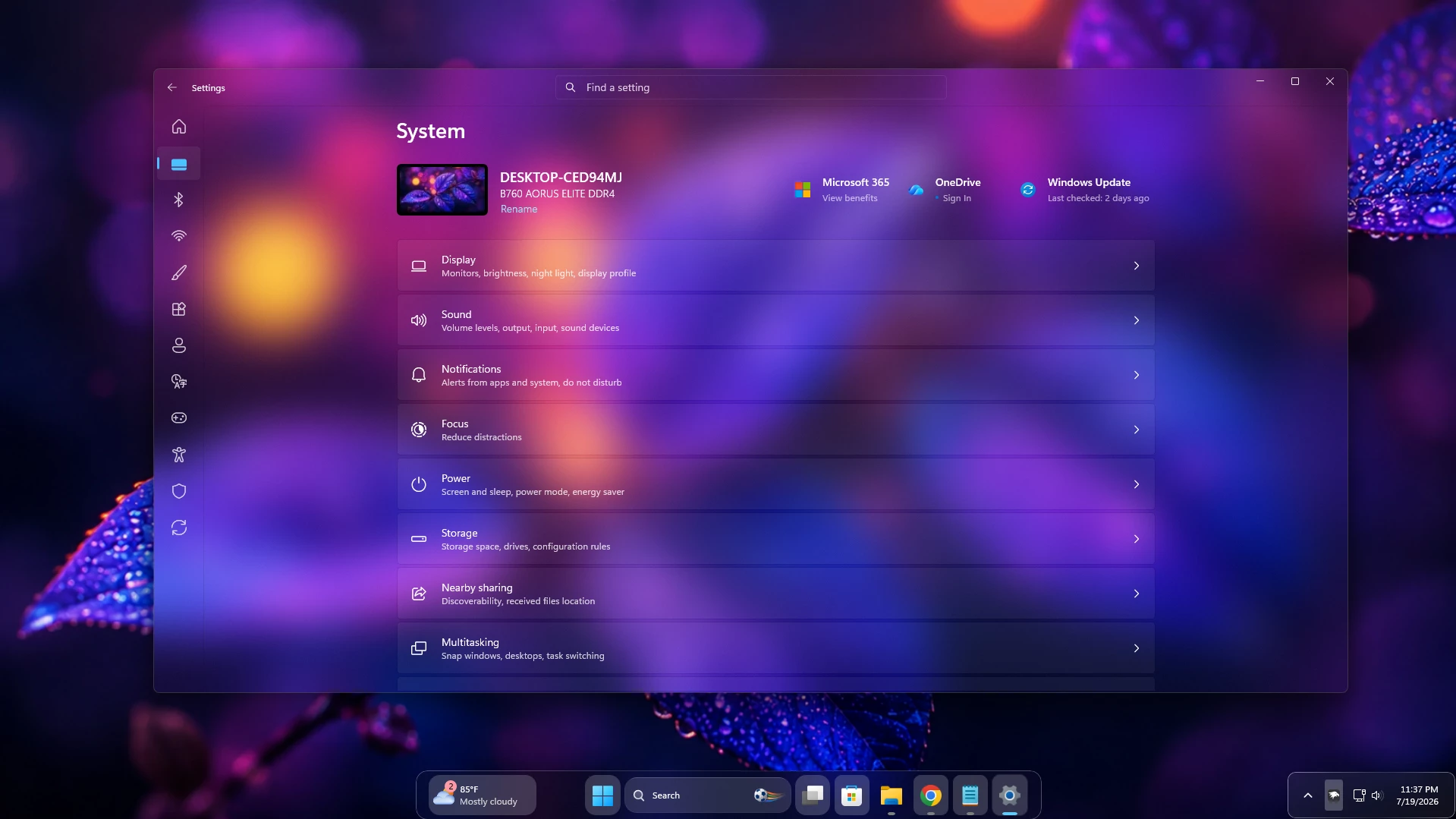
Glass Settings Styler for Windows 11
Glass Settings Styler for Windows 11 is a modern Windhawk customization style designed to give the Windows Settings app a clean, transparent, and premium glass-like appearance. It replaces the ordinary solid background with soft transparency, subtle blur effects, and refined interface elements.
This style is suitable for Windows 11 users who enjoy customizing their desktop with transparent taskbars, modern Start menu designs, dark themes, Rainmeter skins, custom icon packs, and stylish wallpapers. It helps the Settings app match the overall look of a personalized desktop setup.
What Is Glass Settings Styler?
Glass Settings Styler is a visual customization preset created for the Windows 11 Settings Styler mod available through Windhawk. It focuses on improving the appearance of the Settings interface without replacing the application or changing essential Windows functions.
The style can add transparent backgrounds, blurred panels, cleaner navigation areas, modern cards, rounded interface sections, and improved spacing. These visual changes make the Settings app look more elegant while keeping its main options easy to find and use.
The final appearance may vary depending on your Windows 11 version, wallpaper, system theme, transparency settings, and installed Windhawk mod version.
Modern Glass Interface
The main feature of this style is its smooth glass-inspired design. Soft transparency allows parts of the wallpaper or desktop background to appear behind the Settings window, while the blur effect helps maintain text visibility and interface clarity.
Unlike a fully transparent layout, the frosted-glass effect creates visual depth without making the Settings app difficult to read. It provides a balanced combination of style, simplicity, and usability.
Best Desktop Combinations
Glass Settings Styler works best with dark, abstract, gradient, colorful, or minimal wallpapers. Wallpapers with clear contrast usually make the transparency and blur effects more noticeable.
You can combine this style with a transparent taskbar, customized Start menu, dark application theme, modern cursor pack, Rainmeter widgets, and matching desktop icons. Using similar colors across your desktop can create a more consistent and professional appearance.
Compatibility Information
This style is primarily designed for Windows 11 and requires Windhawk with a compatible Windows 11 Settings Styler mod. Compatibility may change after major Windows updates because Microsoft can modify the Settings app interface.
Before applying the style, check that your Windows build and installed mod version are supported. Read the mod description and available user feedback carefully before changing the configuration.
Installation and Safety Advice
Download Windhawk and related mods only from trusted and official sources. Avoid applying unknown code, scripts, or configuration files without reviewing their source and purpose.
Save a backup copy of your current Settings Styler configuration before installing the new style. This will allow you to restore the previous appearance if the style does not work correctly on your system.
If you notice unreadable text, missing buttons, broken navigation areas, unusual spacing, or visual glitches, disable the style and restore the default configuration. Avoid running multiple Settings app styles at the same time unless they are specifically designed to work together.
Why Use Glass Settings Styler?
Glass Settings Styler is a good choice for users who want a more modern Settings interface without making complicated system changes. It provides a noticeable visual improvement while keeping the original structure and functionality of the Windows 11 Settings app.
The clean glass design can make your customized desktop feel more complete, especially when combined with other transparent or blurred Windows interface styles.
- Modern glass-style Windows 11 Settings interface
- Soft transparency and background blur effects
- Designed for Windhawk Settings Styler customization
- Clean navigation panels and interface cards
- Matches dark, minimal, and transparent desktop themes
- Works well with custom taskbars and Start menu styles
- Suitable for beginner-friendly desktop customization
- Easy to disable using the Windhawk interface
- Supports a cleaner and more consistent desktop appearance
- Does not replace the original Windows Settings app
- Download & Install windhawk.
- install & Open Windows 11 Settings Styler
- Go to the Advanced tab
- Copy the content below and paste it into the text box and click “Save”.
- For more details, visit this GitHub guide
- For more Windhawk Styler, visit Check My Windhawk Category
{ "styleConstants[0]": "OutRadius=8", "styleConstants[1]": "InRadius=4", "styleConstants[2]": "BgBorder=<SolidColorBrush Color=\"{ThemeResource Border}\" />", "styleConstants[3]": "BgOverlay=<SolidColorBrush Color=\"{ThemeResource Overlay}\" />", "styleConstants[4]": "Apps=<Viewbox Width=\"20\" Height=\"20\" Stretch=\"Uniform\"><PathIcon Data=\"M17,6.5C17,6.8 16.9,7.1 16.7,7.3L14,10C13.8,10.2 13.6,10.3 13.3,10.3C13,10.3 12.8,10.2 12.6,10L9.9,7.3C9.7,7.1 9.6,6.8 9.6,6.5C9.6,6.2 9.7,5.9 9.9,5.7L12.6,3C12.8,2.8 13,2.7 13.3,2.7C13.6,2.7 13.8,2.8 14,3L16.7,5.7C16.9,5.9 17,6.2 17,6.5Z M8.5,10.5L8.5,4.5C8.5,4.2 8.4,4 8.2,3.9C8,3.8 7.8,3.7 7.5,3.7L3.5,3.7C3.2,3.7 3,3.8 2.9,3.9C2.8,4 2.7,4.2 2.7,4.5L2.7,10.5Z M11.5,10.5L9.7,8.7L9.7,10.5Z M8.5,17.3L8.5,11.5L2.7,11.5L2.7,16.8C2.7,17.1 2.8,17.3 2.9,17.4C3,17.5 3.2,17.6 3.5,17.6Z M16,12.2C16,12 15.9,11.8 15.7,11.7C15.6,11.6 15.4,11.5 15.2,11.5L9.7,11.5L9.7,17.3L15.2,17.3C15.4,17.3 15.6,17.2 15.7,17.1C15.9,17 16,16.8 16,16.6Z\" VerticalAlignment=\"Center\" HorizontalAlignment=\"Center\" /></Viewbox>", "styleConstants[5]": "Games=<Viewbox Width=\"23\" Height=\"20\" Stretch=\"Fill\"><PathIcon Data=\"F1 M7.5 4C4.46243 4 2 6.46243 2 9.5C2 12.5376 4.46243 15 7.5 15H12.5C15.5376 15 18 12.5376 18 9.5C18 6.46243 15.5376 4 12.5 4H7.5ZM6 7.5C6 7.22386 6.22386 7 6.5 7C6.77614 7 7 7.22386 7 7.5V9H8.5C8.77614 9 9 9.22386 9 9.5C9 9.77614 8.77614 10 8.5 10H7V11.5C7 11.7761 6.77614 12 6.5 12C6.22386 12 6 11.7761 6 11.5V10H4.5C4.22386 10 4 9.77614 4 9.5C4 9.22386 4.22386 9 4.5 9H6V7.5ZM15 8C15 8.55228 14.5523 9 14 9C13.4477 9 13 8.55228 13 8C13 7.44772 13.4477 7 14 7C14.5523 7 15 7.44772 15 8ZM12 12C11.4477 12 11 11.5523 11 11C11 10.4477 11.4477 10 12 10C12.5523 10 13 10.4477 13 11C13 11.5523 12.5523 12 12 12Z\" VerticalAlignment=\"Center\" HorizontalAlignment=\"Center\"/></Viewbox>", "styleConstants[6]": "System=<Viewbox Width=\"20\" Height=\"20\" Stretch=\"Uniform\"><PathIcon Data=\"M20,20z M0,0z M19.98,15C19.98,16.38,18.87,17.49,17.49,17.49L2.52,17.49C1.13,17.49,0.02,16.38,0.02,15L0.02,13.74 19.98,13.74 19.98,15z M17.49,2.52C18.87,2.52,19.98,3.63,19.98,5.02L19.98,12.5 0.02,12.5 0.02,5.02C0.02,3.63,1.13,2.52,2.52,2.52L17.49,2.52z\" /> </Viewbox>", "styleConstants[7]": "EOA=<Viewbox Width=\"30\" Height=\"32\" Stretch=\"Fill\"> <PathIcon Data=\"F1 M10 6C11.1046 6 12 5.10457 12 4C12 2.89543 11.1046 2 10 2C8.89543 2 8 2.89543 8 4C8 5.10457 8.89543 6 10 6ZM5.4719 4.15059C4.59026 3.75806 3.55353 4.15168 3.15457 5.03042C2.75442 5.91176 3.1474 6.94681 4.03165 7.3405L6.70334 8.53002C6.88375 8.61034 6.99997 8.78931 6.99997 8.98679V10.8519C6.99997 10.9161 6.98761 10.9797 6.96357 11.0392L5.12327 15.5941C4.76122 16.4902 5.19416 17.5101 6.09028 17.8722C6.9864 18.2342 8.00636 17.8013 8.36842 16.9052L9.76592 13.4462C9.85014 13.2378 10.1453 13.2378 10.2295 13.4462L11.6269 16.905C11.989 17.8011 13.009 18.2341 13.9051 17.872C14.8012 17.51 15.2341 16.49 14.8721 15.5939L13.0364 11.0504C13.0123 10.9908 13 10.9272 13 10.8631V8.98679C13 8.78931 13.1162 8.61034 13.2966 8.53002L15.9683 7.3405C16.8525 6.94681 17.2455 5.91176 16.8454 5.03042C16.4464 4.15168 15.4097 3.75806 14.5281 4.15059L13.2519 4.71874C13.0057 4.82838 12.8303 5.02588 12.7315 5.24269C12.2586 6.28043 11.2128 7.00012 10 7.00012C8.78722 7.00012 7.74147 6.28044 7.2685 5.24271C7.16969 5.0259 6.99432 4.82841 6.74808 4.71878L5.4719 4.15059Z\" HorizontalAlignment=\"Center\" VerticalAlignment=\"Center\" /></Viewbox>", "styleConstants[8]": "Personalize=<Viewbox Width=\"20\" Height=\"20\" Stretch=\"Uniform\"><PathIcon Data=\"M19.99,1.8C19.99,2.2 19.88,2.6 19.58,3.06L17.91,5.49C16.58,7.43 15.16,9.27 13.64,11.02C12.12,12.77 10.49,14.44 8.75,16.03C8.66,17.33 8.1,18.09 7.74,18.41C7.11,18.92 6.37,19.31 5.58,19.61C4.76,19.85 3.92,19.97 3.12,20C2.26,19.96 1.76,19.9 1.02,19.78C0.44,19.62 0.09,19.39 0.09,19.02C0.23,18.67 0.74,18.31 1.27,17.9C1.75,17.47 2.15,17.03 2.36,16.54C2.48,16.01 2.63,15.09 2.76,14.74C2.91,14.39 3.12,14.1 3.36,13.86C3.84,13.45 4.42,13.17 5.05,13C6.36,11.27 7.92,9.42 9.58,7.05C11.24,5.31 13.01,3.67 14.89,2.12L16.81,0.55C17.22,0.26 17.68,0.09 18.17,0.09C18.64,0.09 19.09,0.26 19.45,0.54C19.75,0.89 19.99,1.34 19.99,1.8Z\" /></Viewbox>", "controlStyles[0].target": "Border > Frame > ContentPresenter > SystemSettings.View.RootPage > Grid#RootPageGrid > Microsoft.UI.Xaml.Controls.NavigationView#PermanentNavigationView > Grid#RootGrid > Grid > SplitView#RootSplitView > Grid > Grid#ContentRoot > Border > Grid#ContentGrid > ContentPresenter#ContentPresenter", "controlStyles[0].styles[0]": "Margin=2", "controlStyles[1].target": "Grid#ContentRoot > Border > Grid#ContentGrid > ContentControl#HeaderContent", "controlStyles[1].styles[0]": "Margin=10,-38,0,5", "controlStyles[2].target": "SplitView#RootSplitView > Grid > Grid#PaneRoot > Border > Grid#PaneContentGrid > Grid#ItemsContainerGrid > Microsoft.UI.Xaml.Controls.ItemsRepeaterScrollHost > ScrollViewer#MenuItemsScrollViewer > Border#Root > Grid > ScrollContentPresenter#ScrollContentPresenter", "controlStyles[2].styles[0]": "Margin=-12,8,0,0", "controlStyles[3].target": "TextBox#CommandSearchTextBox > Grid > Button#DeleteButton > Grid#ButtonLayoutGrid", "controlStyles[3].styles[0]": "CornerRadius=$InRadius", "controlStyles[3].styles[1]": "MinHeight=32", "controlStyles[4].target": "TextBox#CommandSearchTextBox", "controlStyles[4].styles[0]": "CornerRadius=$InRadius", "controlStyles[4].styles[1]": "MinHeight=32", "controlStyles[5].target": "StackPanel#SettingsCommandSearchBoxBackground", "controlStyles[5].styles[0]": "CornerRadius=$InRadius", "controlStyles[5].styles[1]": "MinHeight=32", "controlStyles[6].target": "SplitView#RootSplitView > Grid > Grid#PaneRoot > Border > Grid#PaneContentGrid > Grid#ItemsContainerGrid > Microsoft.UI.Xaml.Controls.ItemsRepeaterScrollHost > ScrollViewer#MenuItemsScrollViewer > Border#Root > Grid > ScrollContentPresenter#ScrollContentPresenter > Microsoft.UI.Xaml.Controls.ItemsRepeater#MenuItemsHost > SystemSettings.View.SettingsNavigationViewItem > Grid#NVIRootGrid > Microsoft.UI.Xaml.Controls.Primitives.NavigationViewItemPresenter#NavigationViewItemPresenter > Grid#LayoutRoot > Grid#PresenterContentRootGrid > Grid#ContentGrid > ContentPresenter#ContentPresenter > TextBlock", "controlStyles[6].styles[0]": "Grid.Column=0", "controlStyles[6].styles[1]": "Visibility=Hidden", "controlStyles[7].target": "SplitView#RootSplitView > Grid > Grid#PaneRoot > Border > Grid#PaneContentGrid > Grid#ItemsContainerGrid > Microsoft.UI.Xaml.Controls.ItemsRepeaterScrollHost > ScrollViewer#MenuItemsScrollViewer > Border#Root > Grid > ScrollContentPresenter#ScrollContentPresenter > Microsoft.UI.Xaml.Controls.ItemsRepeater#MenuItemsHost > SystemSettings.View.SettingsNavigationViewItem", "controlStyles[7].styles[0]": "MinHeight=48", "controlStyles[7].styles[1]": "MinWidth=65", "controlStyles[7].styles[2]": "ToolTipService.Placement=5", "controlStyles[7].styles[3]": "MaxWidth=65", "controlStyles[8].target": "Microsoft.UI.Xaml.Controls.NavigationView#PermanentNavigationView > Grid#RootGrid > Grid > SplitView#RootSplitView > Grid@DisplayModeStates > Grid#PaneRoot", "controlStyles[8].styles[0]": "MaxWidth@OpenInlineLeft=65", "controlStyles[8].styles[1]": "Grid.ColumnSpan@OpenInlineLeft=1", "controlStyles[8].styles[2]": "Grid.ColumnSpan=>Span", "controlStyles[9].target": "SplitView#RootSplitView > Grid > Grid#ContentRoot > Border > Grid#ContentGrid", "controlStyles[9].styles[0]": "Background:=<AcrylicBrush BackgroundSource=\"HostBackdrop\" TintColor=\"#00000000\" FallbackColor=\"#00000000\" TintOpacity=\"0\" TintLuminosityOpacity=\"0\" Opacity=\"1\"/>", "controlStyles[9].styles[1]": "CornerRadius={{Span > 1 ? 0 : $OutRadius}},0,0,0", "controlStyles[9].styles[2]": "Margin={{Span > 1 ? 0 : 65}},48,0,0", "controlStyles[9].styles[3]": "BorderBrush:=$BgBorder", "controlStyles[9].styles[4]": "BorderThickness={{Span > 1 ? 0 : 1}},1,0,0", "controlStyles[10].target": "Microsoft.UI.Xaml.Controls.NavigationView#PermanentNavigationView > Grid#RootGrid > Grid > SplitView#RootSplitView > Grid@DisplayModeStates > Grid#ContentRoot", "controlStyles[10].styles[0]": "Grid.Column@OpenInlineLeft=0", "controlStyles[10].styles[1]": "Grid.ColumnSpan@OpenInlineLeft=3", "controlStyles[11].target": "Microsoft.UI.Xaml.Controls.NavigationView#PermanentNavigationView > Grid#RootGrid > Grid > Grid#ShadowCaster", "controlStyles[11].styles[0]": "Grid.ColumnSpan=1", "controlStyles[11].styles[1]": "MaxWidth=65", "controlStyles[12].target": "SystemSettings.View.SettingsNavigationViewItem > Grid#NVIRootGrid > Microsoft.UI.Xaml.Controls.Primitives.NavigationViewItemPresenter#NavigationViewItemPresenter > Grid#LayoutRoot > Grid#PresenterContentRootGrid > Grid#ContentGrid > ContentPresenter#ContentPresenter > TextBlock", "controlStyles[12].styles[0]": "Padding=3,0,0,0", "controlStyles[13].target": "SystemSettings.View.SettingsNavigationViewItem > Grid#NVIRootGrid > Microsoft.UI.Xaml.Controls.Primitives.NavigationViewItemPresenter#NavigationViewItemPresenter > Grid#LayoutRoot@PointerStates > Grid#PresenterContentRootGrid > Grid#ContentGrid > Border#IconColumn > Viewbox#IconBox > Border > ContentPresenter#Icon", "controlStyles[13].styles[0]": "FontFamily=Segoe Fluent Icons", "controlStyles[13].styles[1]": "Foreground@Normal:=<SolidColorBrush Color=\"{ThemeResource TextFillColorSecondary}\" />", "controlStyles[13].styles[2]": "Foreground@PointerOver:=<SolidColorBrush Color=\"{ThemeResource TextFillColorPrimary}\" />", "controlStyles[13].styles[3]": "Foreground@Pressed:=<SolidColorBrush Color=\"{ThemeResource TextFillColorPrimary}\" />", "controlStyles[13].styles[4]": "Foreground@Selected:=<SolidColorBrush Color=\"{ThemeResource Accent}\" />", "controlStyles[13].styles[5]": "Foreground@PointerOverSelected:=<SolidColorBrush Color=\"{ThemeResource Accent}\" />", "controlStyles[13].styles[6]": "Foreground@PressedSelected:=<SolidColorBrush Color=\"{ThemeResource Accent}\" />", "controlStyles[13].styles[7]": "FontSize=20", "controlStyles[13].styles[8]": "Margin=15,0,-2,0", "controlStyles[14].target": "SystemSettings.View.SettingsNavigationViewItem[Content=Home] > Grid#NVIRootGrid > Microsoft.UI.Xaml.Controls.Primitives.NavigationViewItemPresenter#NavigationViewItemPresenter > Grid#LayoutRoot@PointerStates > Grid#PresenterContentRootGrid > Grid#ContentGrid > Border#IconColumn > Viewbox#IconBox > Border > ContentPresenter#Icon", "controlStyles[14].styles[0]": "Content@Normal:=", "controlStyles[14].styles[1]": "Content@PointerOver:=", "controlStyles[14].styles[2]": "Content@Pressed:=", "controlStyles[14].styles[3]": "Content@Selected:=", "controlStyles[14].styles[4]": "Content@PointerOverSelected:=", "controlStyles[14].styles[5]": "Content@PressedSelected:=", "controlStyles[15].target": "SystemSettings.View.SettingsNavigationViewItem[Content=System] > Grid#NVIRootGrid > Microsoft.UI.Xaml.Controls.Primitives.NavigationViewItemPresenter#NavigationViewItemPresenter > Grid#LayoutRoot@PointerStates > Grid#PresenterContentRootGrid > Grid#ContentGrid > Border#IconColumn > Viewbox#IconBox > Border > ContentPresenter#Icon", "controlStyles[15].styles[0]": "Content@Normal:=", "controlStyles[15].styles[1]": "Content@PointerOver:=", "controlStyles[15].styles[2]": "Content@Pressed:=", "controlStyles[15].styles[3]": "Content@Selected:=$System", "controlStyles[15].styles[4]": "Content@PointerOverSelected:=$System", "controlStyles[15].styles[5]": "Content@PressedSelected:=$System", "controlStyles[16].target": "SystemSettings.View.SettingsNavigationViewItem[3] > Grid#NVIRootGrid > Microsoft.UI.Xaml.Controls.Primitives.NavigationViewItemPresenter#NavigationViewItemPresenter > Grid#LayoutRoot@PointerStates > Grid#PresenterContentRootGrid > Grid#ContentGrid > Border#IconColumn > Viewbox#IconBox > Border > ContentPresenter#Icon", "controlStyles[16].styles[0]": "Content@Normal:=", "controlStyles[16].styles[1]": "Content@PointerOver:=", "controlStyles[16].styles[2]": "Content@Pressed:=", "controlStyles[16].styles[3]": "Content@Selected:=", "controlStyles[16].styles[4]": "Content@PointerOverSelected:=", "controlStyles[16].styles[5]": "Content@PressedSelected:=", "controlStyles[17].target": "SystemSettings.View.SettingsNavigationViewItem[4] > Grid#NVIRootGrid > Microsoft.UI.Xaml.Controls.Primitives.NavigationViewItemPresenter#NavigationViewItemPresenter > Grid#LayoutRoot@PointerStates > Grid#PresenterContentRootGrid > Grid#ContentGrid > Border#IconColumn > Viewbox#IconBox > Border > ContentPresenter#Icon", "controlStyles[17].styles[0]": "Content@Normal:=", "controlStyles[17].styles[1]": "Content@PointerOver:=", "controlStyles[17].styles[2]": "Content@Pressed:=", "controlStyles[17].styles[3]": "Content@Selected:=", "controlStyles[17].styles[4]": "Content@PointerOverSelected:=", "controlStyles[17].styles[5]": "Content@PressedSelected:=", "controlStyles[18].target": "SystemSettings.View.SettingsNavigationViewItem[5] > Grid#NVIRootGrid > Microsoft.UI.Xaml.Controls.Primitives.NavigationViewItemPresenter#NavigationViewItemPresenter > Grid#LayoutRoot@PointerStates > Grid#PresenterContentRootGrid > Grid#ContentGrid > Border#IconColumn > Viewbox#IconBox > Border > ContentPresenter#Icon", "controlStyles[18].styles[0]": "Content@Normal:=", "controlStyles[18].styles[1]": "Content@PointerOver:=", "controlStyles[18].styles[2]": "Content@Pressed:=", "controlStyles[18].styles[3]": "Content@Selected:=$EOA", "controlStyles[18].styles[4]": "Content@PointerOverSelected:=$EOA", "controlStyles[18].styles[5]": "Content@PressedSelected:=$EOA", "controlStyles[19].target": "SystemSettings.View.SettingsNavigationViewItem[6] > Grid#NVIRootGrid > Microsoft.UI.Xaml.Controls.Primitives.NavigationViewItemPresenter#NavigationViewItemPresenter > Grid#LayoutRoot@PointerStates > Grid#PresenterContentRootGrid > Grid#ContentGrid > Border#IconColumn > Viewbox#IconBox > Border > ContentPresenter#Icon", "controlStyles[19].styles[0]": "Content@Normal:=", "controlStyles[19].styles[1]": "Content@PointerOver:=", "controlStyles[19].styles[2]": "Content@Pressed:=", "controlStyles[19].styles[3]": "Content@Selected:=$Games", "controlStyles[19].styles[4]": "Content@PointerOverSelected:=$Games", "controlStyles[19].styles[5]": "Content@PressedSelected:=$Games", "controlStyles[20].target": "SystemSettings.View.SettingsNavigationViewItem[7] > Grid#NVIRootGrid > Microsoft.UI.Xaml.Controls.Primitives.NavigationViewItemPresenter#NavigationViewItemPresenter > Grid#LayoutRoot@PointerStates > Grid#PresenterContentRootGrid > Grid#ContentGrid > Border#IconColumn > Viewbox#IconBox > Border > ContentPresenter#Icon", "controlStyles[20].styles[0]": "Content@Normal:=", "controlStyles[20].styles[1]": "Content@PointerOver:=", "controlStyles[20].styles[2]": "Content@Pressed:=", "controlStyles[20].styles[3]": "Content@Selected:=", "controlStyles[20].styles[4]": "Content@PointerOverSelected:=", "controlStyles[20].styles[5]": "Content@PressedSelected:=", "controlStyles[21].target": "SystemSettings.View.SettingsNavigationViewItem[8] > Grid#NVIRootGrid > Microsoft.UI.Xaml.Controls.Primitives.NavigationViewItemPresenter#NavigationViewItemPresenter > Grid#LayoutRoot@PointerStates > Grid#PresenterContentRootGrid > Grid#ContentGrid > Border#IconColumn > Viewbox#IconBox > Border > ContentPresenter#Icon", "controlStyles[21].styles[0]": "Content@Normal:=", "controlStyles[21].styles[1]": "Content@PointerOver:=", "controlStyles[21].styles[2]": "Content@Pressed:=", "controlStyles[21].styles[3]": "Content@Selected:=", "controlStyles[21].styles[4]": "Content@PointerOverSelected:=", "controlStyles[21].styles[5]": "Content@PressedSelected:=", "controlStyles[22].target": "SystemSettings.View.SettingsNavigationViewItem[9] > Grid#NVIRootGrid > Microsoft.UI.Xaml.Controls.Primitives.NavigationViewItemPresenter#NavigationViewItemPresenter > Grid#LayoutRoot@PointerStates > Grid#PresenterContentRootGrid > Grid#ContentGrid > Border#IconColumn > Viewbox#IconBox > Border > ContentPresenter#Icon", "controlStyles[22].styles[0]": "Content@Normal:=", "controlStyles[22].styles[1]": "Content@PointerOver:=", "controlStyles[22].styles[2]": "Content@Pressed:=", "controlStyles[22].styles[3]": "Content@Selected:=$Apps", "controlStyles[22].styles[4]": "Content@PointerOverSelected:=$Apps", "controlStyles[22].styles[5]": "Content@PressedSelected:=$Apps", "controlStyles[23].target": "SystemSettings.View.SettingsNavigationViewItem[10] > Grid#NVIRootGrid > Microsoft.UI.Xaml.Controls.Primitives.NavigationViewItemPresenter#NavigationViewItemPresenter > Grid#LayoutRoot@PointerStates > Grid#PresenterContentRootGrid > Grid#ContentGrid > Border#IconColumn > Viewbox#IconBox > Border > ContentPresenter#Icon", "controlStyles[23].styles[0]": "Content@Normal:=", "controlStyles[23].styles[1]": "Content@PointerOver:=", "controlStyles[23].styles[2]": "Content@Pressed:=", "controlStyles[23].styles[3]": "Content@Selected:=$Personalize", "controlStyles[23].styles[4]": "Content@PointerOverSelected:=$Personalize", "controlStyles[23].styles[5]": "Content@PressedSelected:=$Personalize", "controlStyles[24].target": "SystemSettings.View.SettingsNavigationViewItem[11] > Grid#NVIRootGrid > Microsoft.UI.Xaml.Controls.Primitives.NavigationViewItemPresenter#NavigationViewItemPresenter > Grid#LayoutRoot@PointerStates > Grid#PresenterContentRootGrid > Grid#ContentGrid > Border#IconColumn > Viewbox#IconBox > Border > ContentPresenter#Icon", "controlStyles[24].styles[0]": "Content@Normal:=", "controlStyles[24].styles[1]": "Content@PointerOver:=", "controlStyles[24].styles[2]": "Content@Pressed:=", "controlStyles[24].styles[3]": "Content@Selected:=", "controlStyles[24].styles[4]": "Content@PointerOverSelected:=", "controlStyles[24].styles[5]": "Content@PressedSelected:=", "controlStyles[25].target": "SystemSettings.View.SettingsNavigationViewItem[12] > Grid#NVIRootGrid > Microsoft.UI.Xaml.Controls.Primitives.NavigationViewItemPresenter#NavigationViewItemPresenter > Grid#LayoutRoot@PointerStates > Grid#PresenterContentRootGrid > Grid#ContentGrid > Border#IconColumn > Viewbox#IconBox > Border > ContentPresenter#Icon", "controlStyles[25].styles[0]": "Content@Normal:=", "controlStyles[25].styles[1]": "Content@PointerOver:=", "controlStyles[25].styles[2]": "Content@Pressed:=", "controlStyles[25].styles[3]": "Content@Selected:=", "controlStyles[25].styles[4]": "Content@PointerOverSelected:=", "controlStyles[25].styles[5]": "Content@PressedSelected:=", "controlStyles[26].target": "SystemSettings.View.SettingsNavigationViewItem[1]", "controlStyles[26].styles[0]": "Content=>t1", "controlStyles[26].styles[1]": "ToolTipService.ToolTip={{t1}}", "controlStyles[27].target": "SystemSettings.View.SettingsNavigationViewItem[2]", "controlStyles[27].styles[0]": "Content=>t2", "controlStyles[27].styles[1]": "ToolTipService.ToolTip={{t2}}", "controlStyles[28].target": "SystemSettings.View.SettingsNavigationViewItem[3]", "controlStyles[28].styles[0]": "Content=>t3", "controlStyles[28].styles[1]": "ToolTipService.ToolTip={{t3}}", "controlStyles[29].target": "SystemSettings.View.SettingsNavigationViewItem[4]", "controlStyles[29].styles[0]": "Content=>t4", "controlStyles[29].styles[1]": "ToolTipService.ToolTip={{t4}}", "controlStyles[30].target": "SystemSettings.View.SettingsNavigationViewItem[5]", "controlStyles[30].styles[0]": "Content=>t5", "controlStyles[30].styles[1]": "ToolTipService.ToolTip={{t5}}", "controlStyles[31].target": "SystemSettings.View.SettingsNavigationViewItem[6]", "controlStyles[31].styles[0]": "Content=>t6", "controlStyles[31].styles[1]": "ToolTipService.ToolTip={{t6}}", "controlStyles[32].target": "SystemSettings.View.SettingsNavigationViewItem[7]", "controlStyles[32].styles[0]": "Content=>t7", "controlStyles[32].styles[1]": "ToolTipService.ToolTip={{t7}}", "controlStyles[33].target": "SystemSettings.View.SettingsNavigationViewItem[8]", "controlStyles[33].styles[0]": "Content=>t8", "controlStyles[33].styles[1]": "ToolTipService.ToolTip={{t8}}", "controlStyles[34].target": "SystemSettings.View.SettingsNavigationViewItem[9]", "controlStyles[34].styles[0]": "Content=>t9", "controlStyles[34].styles[1]": "ToolTipService.ToolTip={{t9}}", "controlStyles[35].target": "SystemSettings.View.SettingsNavigationViewItem[10]", "controlStyles[35].styles[0]": "Content=>t10", "controlStyles[35].styles[1]": "ToolTipService.ToolTip={{t10}}", "controlStyles[36].target": "SystemSettings.View.SettingsNavigationViewItem[11]", "controlStyles[36].styles[0]": "Content=>t11", "controlStyles[36].styles[1]": "ToolTipService.ToolTip={{t11}}", "controlStyles[37].target": "SystemSettings.View.SettingsNavigationViewItem[12]", "controlStyles[37].styles[0]": "Content=>t12", "controlStyles[37].styles[1]": "ToolTipService.ToolTip={{t12}}", "controlStyles[38].target": "SplitView#RootSplitView > Grid > Grid#PaneRoot > Border > Grid#PaneContentGrid > ContentControl#PaneCustomContentBorder > ContentPresenter > SystemSettings.View.SpacingStackPanel > SystemSettings.View.UserProfileControl#UserProfileControl > Button#UserProfileButton > ContentPresenter#ContentPresenter > Grid#UserProfileLayout > Grid[2]", "controlStyles[38].styles[0]": "Visibility=1", "controlStyles[38].styles[1]": "Grid.Column=0", "controlStyles[39].target": "ContentControl#PaneCustomContentBorder > ContentPresenter > SystemSettings.View.SpacingStackPanel > SystemSettings.View.UserProfileControl#UserProfileControl > Button#UserProfileButton > ContentPresenter#ContentPresenter > Grid#UserProfileLayout > Grid[2] > TextBlock#UserName", "controlStyles[39].styles[0]": "Text=>UserName", "controlStyles[40].target": "ContentControl#PaneCustomContentBorder > ContentPresenter > SystemSettings.View.SpacingStackPanel > SystemSettings.View.UserProfileControl#UserProfileControl > Button#UserProfileButton", "controlStyles[40].styles[0]": "ToolTipService.ToolTip={{UserName}}", "controlStyles[40].styles[1]": "ToolTipService.Placement=10", "controlStyles[40].styles[2]": "Visibility=1", "controlStyles[41].target": "ContentControl#PaneCustomContentBorder > ContentPresenter > SystemSettings.View.SpacingStackPanel > SystemSettings.View.UserProfileControl#UserProfileControl > Button#UserProfileButton > ContentPresenter#ContentPresenter > Grid#UserProfileLayout > Grid#UserImageGrid > Image", "controlStyles[41].styles[0]": "Width=30", "controlStyles[41].styles[1]": "Height=30", "controlStyles[42].target": "SplitView#RootSplitView > Grid > Grid#PaneRoot > Border > Grid#PaneContentGrid > ContentControl#PaneCustomContentBorder > ContentPresenter > SystemSettings.View.SpacingStackPanel", "controlStyles[42].styles[0]": "MaxHeight=48", "controlStyles[42].styles[1]": "MaxWidth=65", "controlStyles[42].styles[2]": "MinHeight=48", "controlStyles[42].styles[3]": "MinWidth=65", "controlStyles[42].styles[4]": "Visibility=1", "controlStyles[43].target": "SplitView#RootSplitView > Grid > Grid#PaneRoot > Border > Grid#PaneContentGrid > ContentControl#PaneCustomContentBorder > ContentPresenter > SystemSettings.View.SpacingStackPanel > SystemSettings.View.UserProfileControl#UserProfileControl > Button#UserProfileButton", "controlStyles[43].styles[0]": "MinHeight=48", "controlStyles[43].styles[1]": "MaxHeight=48", "controlStyles[43].styles[2]": "Margin=3,3,3,-3", "controlStyles[44].target": "Windows.UI.Xaml.Shapes.Rectangle#ProgressBarIndicator", "controlStyles[44].styles[0]": "RadiusX=3", "controlStyles[44].styles[1]": "RadiusY=3", "controlStyles[44].styles[2]": "Height=6", "controlStyles[44].styles[3]": "Fill:=<SolidColorBrush Color=\"{ThemeResource Accent}\"/>", "controlStyles[45].target": "Windows.UI.Xaml.Controls.Border#DeterminateRoot", "controlStyles[45].styles[0]": "CornerRadius=3", "controlStyles[45].styles[1]": "Height=6", "controlStyles[46].target": "Windows.UI.Xaml.Controls.ProgressBar", "controlStyles[46].styles[0]": "Height=6", "controlStyles[47].target": "Windows.UI.Xaml.Controls.StackPanel#TopBreakdownBar > Windows.UI.Xaml.Controls.ProgressBar > Windows.UI.Xaml.Controls.Grid > Windows.UI.Xaml.Controls.Border#DeterminateRoot > Windows.UI.Xaml.Shapes.Rectangle#ProgressBarIndicator", "controlStyles[47].styles[0]": "Height=16", "controlStyles[48].target": "Windows.UI.Xaml.Controls.StackPanel#TopBreakdownBar > Windows.UI.Xaml.Controls.ProgressBar > Windows.UI.Xaml.Controls.Grid > Windows.UI.Xaml.Controls.Border#DeterminateRoot", "controlStyles[48].styles[0]": "Height=16", "controlStyles[49].target": "Windows.UI.Xaml.Controls.StackPanel#TopBreakdownBar > Windows.UI.Xaml.Controls.ProgressBar", "controlStyles[49].styles[0]": "Height=16", "controlStyles[50].target": "Microsoft.UI.Xaml.Controls.NavigationView#PermanentNavigationView > Grid#RootGrid > Grid > SplitView#RootSplitView > Grid@DisplayModeStates > Grid#PaneRoot", "controlStyles[50].styles[0]": "Background:=<AcrylicBrush BackgroundSource=\"HostBackdrop\" TintColor=\"#00000000\" FallbackColor=\"#00000000\" TintOpacity=\"0\" TintLuminosityOpacity=\"0\" Opacity=\"1\"/>", "controlStyles[51].target": "Grid#ContentRoot > Border > Grid#ContentGrid > ContentControl#HeaderContent", "controlStyles[51].styles[0]": "Background:=<AcrylicBrush BackgroundSource=\"HostBackdrop\" TintColor=\"#00000000\" FallbackColor=\"#00000000\" TintOpacity=\"0\" TintLuminosityOpacity=\"0\" Opacity=\"1\"/>", "themeResourceVariables[0]": "Overlay@Light=#55FFFFFF", "themeResourceVariables[1]": "Overlay@Dark=#09FFFFFF", "themeResourceVariables[2]": "Border@Light=#0F000000", "themeResourceVariables[3]": "Border@Dark=#19000000", "themeResourceVariables[4]": "Accent@Dark={ThemeResource SystemAccentColorLight2}", "themeResourceVariables[5]": "Accent@Light={ThemeResource SystemAccentColorDark1}", "controlStyles[52].target": "Frame#PermanentNavRootFrame", "controlStyles[52].styles[0]": "Background:=<AcrylicBrush BackgroundSource=\"HostBackdrop\" TintColor=\"#00000000\" FallbackColor=\"#00000000\" TintOpacity=\"0\" TintLuminosityOpacity=\"0\" Opacity=\"1\"/>", "controlStyles[53].target": "Border > Frame > ContentPresenter > SystemSettings.View.RootPage > Grid#RootPageGrid", "controlStyles[53].styles[0]": "Background:=<AcrylicBrush BackgroundSource=\"HostBackdrop\" TintColor=\"#00000000\" FallbackColor=\"#00000000\" TintOpacity=\"0\" TintLuminosityOpacity=\"0\" Opacity=\"1\"/>", "controlStyles[54].target": "SystemSettings.View.RootPage > Grid#RootPageGrid", "controlStyles[54].styles[0]": "Background:=<AcrylicBrush BackgroundSource=\"HostBackdrop\" TintColor=\"#00000000\" FallbackColor=\"#00000000\" TintOpacity=\"0\" TintLuminosityOpacity=\"0\" Opacity=\"1\"/>", "controlStyles[55].target": "Microsoft.UI.Xaml.Controls.NavigationView#PermanentNavigationView > Grid#RootGrid", "controlStyles[55].styles[0]": "Background:=<AcrylicBrush BackgroundSource=\"HostBackdrop\" TintColor=\"#00000000\" FallbackColor=\"#00000000\" TintOpacity=\"0\" TintLuminosityOpacity=\"0\" Opacity=\"1\"/>", "controlStyles[56].target": "Microsoft.UI.Xaml.Controls.NavigationView#PermanentNavigationView > Grid#RootGrid > Grid", "controlStyles[56].styles[0]": "Background:=<AcrylicBrush BackgroundSource=\"HostBackdrop\" TintColor=\"#00000000\" FallbackColor=\"#00000000\" TintOpacity=\"0\" TintLuminosityOpacity=\"0\" Opacity=\"1\"/>", "controlStyles[57].target": "Grid#ContentRoot", "controlStyles[57].styles[0]": "Background:=<AcrylicBrush BackgroundSource=\"HostBackdrop\" TintColor=\"#00000000\" FallbackColor=\"#00000000\" TintOpacity=\"0\" TintLuminosityOpacity=\"0\" Opacity=\"1\"/>", "controlStyles[58].target": "SplitView#RootSplitView > Grid > Grid#ContentRoot", "controlStyles[58].styles[0]": "Background:=<AcrylicBrush BackgroundSource=\"HostBackdrop\" TintColor=\"#00000000\" FallbackColor=\"#00000000\" TintOpacity=\"0\" TintLuminosityOpacity=\"0\" Opacity=\"1\"/>", "controlStyles[59].target": "Grid#RootGrid", "controlStyles[59].styles[0]": "Background:=<AcrylicBrush BackgroundSource=\"HostBackdrop\" TintColor=\"#00000000\" FallbackColor=\"#00000000\" TintOpacity=\"0\" TintLuminosityOpacity=\"0\" Opacity=\"1\"/>", "controlStyles[60].target": "Grid#AppTitleBar", "controlStyles[60].styles[0]": "Background:=<AcrylicBrush BackgroundSource=\"HostBackdrop\" TintColor=\"#00000000\" FallbackColor=\"#00000000\" TintOpacity=\"0\" TintLuminosityOpacity=\"0\" Opacity=\"1\"/>", "controlStyles[61].target": "Border#AppTitleBarBackground", "controlStyles[61].styles[0]": "Background:=<AcrylicBrush BackgroundSource=\"HostBackdrop\" TintColor=\"#00000000\" FallbackColor=\"#00000000\" TintOpacity=\"0\" TintLuminosityOpacity=\"0\" Opacity=\"1\"/>", "controlStyles[62].target": "Grid#TitleBar", "controlStyles[62].styles[0]": "Background:=<AcrylicBrush BackgroundSource=\"HostBackdrop\" TintColor=\"#00000000\" FallbackColor=\"#00000000\" TintOpacity=\"0\" TintLuminosityOpacity=\"0\" Opacity=\"1\"/>", "controlStyles[63].target": "Border#TitleBarBackground", "controlStyles[63].styles[0]": "Background:=<AcrylicBrush BackgroundSource=\"HostBackdrop\" TintColor=\"#00000000\" FallbackColor=\"#00000000\" TintOpacity=\"0\" TintLuminosityOpacity=\"0\" Opacity=\"1\"/>", "controlStyles[64].target": "TextBox#CommandSearchTextBox", "controlStyles[64].styles[0]": "CornerRadius=$InRadius", "controlStyles[64].styles[1]": "MinHeight=32", "controlStyles[64].styles[2]": "Background:=<AcrylicBrush BackgroundSource=\"HostBackdrop\" TintColor=\"#00000000\" FallbackColor=\"#00000000\" TintOpacity=\"0\" TintLuminosityOpacity=\"0\" Opacity=\"1\"/>", "controlStyles[64].styles[3]": "BorderBrush:=<SolidColorBrush Color=\"#22FFFFFF\"/>", "controlStyles[64].styles[4]": "BorderThickness=1", "themeResourceVariables[6]": "WindowCaptionBackground@Dark=#00000000", "themeResourceVariables[7]": "WindowCaptionBackground@Light=#00000000", "themeResourceVariables[8]": "WindowCaptionBackgroundDisabled@Dark=#00000000", "themeResourceVariables[9]": "WindowCaptionBackgroundDisabled@Light=#00000000", "themeResourceVariables[10]": "SolidBackgroundFillColorBase@Dark=#00000000", "themeResourceVariables[11]": "SolidBackgroundFillColorBase@Light=#00000000", "themeResourceVariables[12]": "SolidBackgroundFillColorSecondary@Dark=#00000000", "themeResourceVariables[13]": "SolidBackgroundFillColorSecondary@Light=#00000000", "themeResourceVariables[14]": "LayerFillColorDefault@Dark=#00000000", "themeResourceVariables[15]": "LayerFillColorDefault@Light=#00000000", "themeResourceVariables[16]": "ApplicationPageBackgroundThemeBrush@Dark=#00000000", "themeResourceVariables[17]": "ApplicationPageBackgroundThemeBrush@Light=#00000000"}Final Thoughts
Blur Glass Settings Styler is a great choice for Windows 11 users who want a clean, modern, and softly blurred Settings app design. It gives the Settings window a more premium appearance while keeping the interface practical, readable, and easy to use.
This style is especially useful if you are creating a complete Windows 11 customization setup with transparent elements, dark visuals, modern icons, and matching wallpapers. When applied correctly, it can make the Settings app feel more connected and consistent with the rest of your desktop theme.
Always remember to check compatibility, create a backup or system restore point, and install Windhawk mods only from trusted sources. A careful setup will help you use Blur Glass Settings Styler safely and smoothly on Windows 11.
FAQs
Do I need Windhawk for this style?
Yes. Liquid Glass Settings Styler is designed for Windhawk customization, so you need Windhawk and the required Windows 11 Settings Styler mod to apply it properly.
Why is the style not working?
The style may not work if the required mod is not installed, the mod is disabled, the style settings were pasted incorrectly, or your Windows 11 version is not fully compatible. Try updating Windhawk, checking the mod requirements, restarting the Settings app, and restarting Explorer if needed.
Is Liquid Glass Settings Styler safe to use?
Windhawk styles are commonly used for desktop customization, but you should always be careful when changing system UI appearance. Use trusted sources, read the mod details, and create a restore point before applying any new style.
Can I use this style with other Windows 11 themes?
Yes. Liquid Glass Settings Styler can work well with dark themes, transparent taskbars, custom icons, wallpapers, and other matching Windows 11 styles. However, avoid applying too many overlapping UI modifications at the same time because they may conflict with each other.
Will Windows updates affect this style?
Yes, Windows updates may change parts of the Settings app interface. If the style stops working after an update, check for Windhawk updates, update the required mod, and reapply the style if necessary.